Skip to content
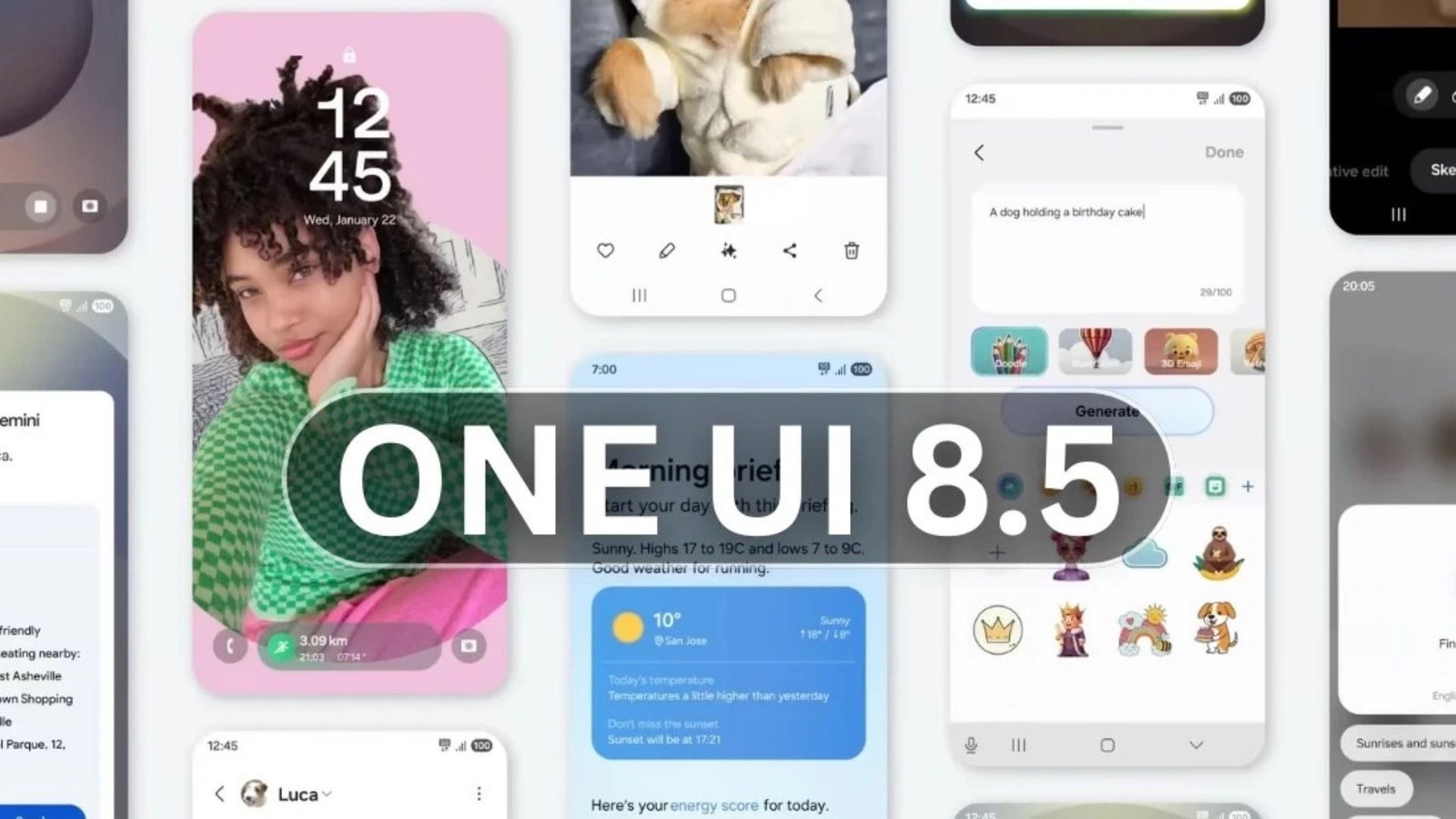
The cadence of major smartphone operating system updates is usually predictable, but every few cycles, an update comes along that fundamentally redefines the user experience. For Samsung Galaxy users, that update is shaping up to be Samsung One UI 8.5.
While the jump to One UI 8.0 served primarily as a necessary alignment with the base Android 16 framework, it was always understood that the real innovation would be delivered in the subsequent point release. Thanks to a series of comprehensive leaks from early firmware builds, we now know that Samsung One UI 8.5 is poised to be that pivotal moment—a foundational overhaul that introduces over 15 significant new features, refines the Galaxy AI experience, and debuts a sweeping new design aesthetic.
The changes uncovered are far from minor polish; they include deeply technical privacy features, major quality-of-life additions, and a level of user customization previously unseen in Samsung’s native software. It signals Samsung’s commitment to evolving beyond standard Android skins and establishing Samsung One UI as the most feature-rich and powerful mobile operating system available. This extensive deep dive will break down every leaked feature, analyze the new design philosophy, and explain why Samsung One UI 8.5 is a game-changer that will set the standard for the next generation of smartphones.
Table of Contents
The New Look: A Major Design Philosophy Shift in Samsung One UI 8.5
For years, Samsung has been iterating on its “one-handed” philosophy, but Samsung One UI 8.5 takes this principle to its logical and most customizable conclusion. The leaked firmware reveals a blend of Google’s modern Material 3 design and a unique, premium aesthetic dubbed by some leakers as ‘Liquid Glass.’
The Customizable Quick Panel Revolution
Without a doubt, the most user-requested and visually dramatic change in Samsung One UI 8.5 is the fully customizable Quick Panel.
In previous versions, the Quick Panel (the area accessed by swiping down from the top of the screen) was largely static, forcing users to keep toggles like Smart View or the Home button whether they used them daily or not. With this update, the Quick Panel is completely dynamic.
- Resizable Toggles: Users can finally resize and rearrange toggles, dedicating more space to features they use constantly, like Wi-Fi and Bluetooth, and minimizing less-used icons.
- Vertical Sliders: The brightness and volume sliders can reportedly be oriented either horizontally (as is traditional) or vertically, catering to different grip styles and one-handed accessibility preferences.
- Removable Elements: Users will gain the ability to remove certain non-essential system buttons entirely, resulting in a cleaner, less cluttered notification shade.
This move toward absolute personalization in Samsung One UI 8.5 transforms a utilitarian system feature into a true user control center, putting power back in the hands of the consumer.
The Material 3 & ‘Liquid Glass’ Aesthetic
Visually, Samsung One UI 8.5 is leaning heavily into a softer, more rounded aesthetic, replacing some of the sharper lines of previous versions. Key design changes include:
- Bottom-Aligned Elements: Core apps like Phone, My Files, and Settings are adopting floating tab bars and bottom-aligned search bars. This major ergonomic shift is designed explicitly for comfortable one-handed operation on ever-larger devices.
- 3D Icons: In a move that may prove divisive, Samsung is introducing a ‘3D’ appearance for system and third-party icons, complete with subtle drop shadows. This echoes the popular ‘skeuomorphism’ of older software designs but in a more refined, modern context. While some worry about battery impact, the visual contrast aims to make the UI pop.
- Refined Notifications: The lock screen notifications are receiving a polish, with improved contrast and a more pronounced blurred background (the “Liquid Glass” effect) to ensure text readability even against busy, colorful wallpapers.
This visual update across Samsung One UI 8.5 aims for consistency and clarity, proving that Samsung is focused on making its design both more usable and distinctly premium.
System App Redesigns
Several core system applications are getting a necessary visual and functional overhaul in Samsung One UI 8.5:
- Phone App: The dialer will feature a new floating tab bar at the bottom, making it easier to switch between Recents, Contacts, and the Keypad. Crucially, it is also expected to include Direct Voicemail, a convenient feature that lets you screen and read a transcription of an incoming voicemail without officially answering the call.
- My Files and Gallery: These apps will sport the new Material 3-inspired look with cleaner interfaces, gradient elements, and more compact navigation bars, dedicating more of the screen to content like photos and documents.
For advanced users looking to fine-tune their device aesthetics even further, these new native customization options complement existing tools perfectly. Before diving into the nitty-gritty of deep system modifications, it’s always helpful to have a strong foundation—you can explore our article on The Best Customization Apps for Android to see how far you can push your phone’s look.
Galaxy AI Gets Smarter: Five Key AI Upgrades in Samsung One UI 8.5
Galaxy AI was the headline feature of the previous generation, but Samsung One UI 8.5 is where the AI truly matures, shifting from a collection of fun tools to an integrated layer of system intelligence.
1. Automatic AI Call Screening
Borrowing a page from Google’s playbook, Samsung One UI 8.5 is rumored to finally introduce fully automated AI Call Screening. Currently, users must manually trigger Bixby Text Call. The new feature will allow the phone to automatically detect suspicious or unknown numbers, handle the call with a natural-sounding voice assistant, and provide a real-time transcript to the user. This removes decision fatigue and makes robocalls a problem of the past.
2. The ‘Private Display’ (Privacy Screen)
One of the most innovative and technologically impressive leaks is the “Private Display” (or Privacy Display) feature. This is a crucial privacy upgrade for anyone who uses their phone in public. It works by limiting screen visibility from side angles, making “shoulder surfing” virtually impossible.
Rumors suggest this feature might be tightly integrated with new hardware (possibly “Flex Magic Pixel” technology debuting on the Galaxy S26 Ultra), allowing users to choose privacy levels, with a “Maximum Privacy” option that aggressively dims the screen for anyone not looking at it head-on. This blend of software (in Samsung One UI 8.5) and advanced hardware protection represents a significant step in mobile security. For more on protecting your digital life, be sure to review our comprehensive Smartphone Security & Privacy Guide.
3. AI Notification Summaries
We all face notification overload. Samsung One UI 8.5 addresses this with AI Notification Summaries. Long, complex notifications (such as lengthy news alerts, email snippets, or extended system updates) will be analyzed by the AI and distilled into a concise, easily digestible, three-sentence summary right in the notification shade. This feature is a massive boost to information triage, allowing users to prioritize alerts without fully opening the corresponding app.
4. Smart Clipboard and Social Composer
The AI is also being integrated into everyday input and content handling:
- Smart Clipboard: When content is copied to the clipboard (e.g., an address, a phone number, or a foreign language phrase), the AI will analyze it and proactively suggest actions in the pop-up clipboard bubble (e.g., “Open in Maps,” “Call Number,” or “Translate”).
- Social Composer: This new tool is expected to use AI to help users craft better social media content, potentially generating caption suggestions, formatting text, or creating appropriate hashtags based on an attached photo or video.
5. Multi-AI Agent Support
A truly future-proof move in Samsung One UI 8.5 is the rumored ability to choose the default AI service. While the core features of Galaxy AI will remain, users might be able to select from different AI models—including Google’s Gemini, Perplexity, and Samsung’s own Gauss—for various tasks. This commitment to choice, rather than a single walled-garden solution, is a powerful differentiator for the Samsung One UI ecosystem. You can read more about Samsung’s strategy for AI democratization in their latest updates, as covered by major technology outlets like Android Authority [External Link: [Insert a high-traffic Android Authority link about One UI 8.5 AI]].
System and Feature Enhancements for Power Users
Beyond the visual and AI changes, Samsung One UI 8.5 is set to deliver several core system upgrades that significantly improve daily convenience and device performance.
NFC-Based Quick Share
Samsung’s Quick Share is already a robust answer to Apple’s AirDrop, but the new version in Samsung One UI 8.5 adds a crucial layer of convenience: NFC activation. Users will be able to initiate a high-speed file transfer simply by tapping two compatible devices together, eliminating the need to wait for device discovery or manually approve connections. The initial NFC tap sets up the secure connection, and the transfer then leverages fast Wi-Fi Direct technology, giving it the seamless, “magical” feel that speeds up the transfer of large files instantly.
Built-in Double Back-Tap Gesture
A feature previously only available to power users via the advanced Good Lock customization app will now be integrated directly into the core Samsung One UI operating system. The Double Back-Tap gesture allows users to quickly perform a custom action—such as taking a screenshot, toggling the flashlight, or launching a favorite app—by simply double-tapping the back of the phone. This small but powerful addition streamlines accessibility and interaction.
The Return of Pollen Tracking in the Weather App
A small but highly requested feature for millions of users: the Weather app in Samsung One UI 8.5 is bringing back detailed Pollen Tracking. The app will display levels for different types of allergens (trees, grass, ragweed) with severity labels. For allergy sufferers, this simple integration removes the need for a separate third-party application, providing actionable health information at a glance.
Auto Blocker Pausing and Enhanced Security
Security is a continual focus. While Samsung’s Auto Blocker feature is essential for preventing risky actions like unauthorized software updates or sideloading, it can frustrate developers and enthusiasts who need temporary access. Samsung One UI 8.5 will reportedly allow users to “Pause Auto Blocker” for 30 minutes, allowing for temporary activities without sacrificing long-term security posture. This pragmatic approach recognizes the needs of different user bases.
Pro-Grade Camera and Video Upgrades
For mobile creators, the camera app in Samsung One UI 8.5 is receiving significant attention. Leaks point to new support for professional features:
- LUT (Look-Up Table) Profiles: Allowing videographers to apply cinematic color grading profiles directly within the native camera app.
- 3D Spatial Recording: A feature likely designed to leverage new hardware for depth and spatial video capture, aligning with the growth of mixed reality and XR devices.
- APV (Advanced Professional Video) Support: Further expanding the manual controls and high-bitrate recording options for serious film-making on a Galaxy device.
For a detailed visual walkthrough of the new design, including the 3D icons and app redesigns, you can refer to the comprehensive leak coverage published by SamMobile [External Link: [Insert a high-traffic SamMobile link about One UI 8.5 visual leaks]].
The Timeline: When to Expect Samsung One UI 8.5
The release schedule for Samsung One UI 8.5 follows a familiar pattern. It is expected to make its official debut alongside the launch of the flagship Galaxy S26 series in early 2026, likely in January.
Following the initial flagship launch, the update will then roll out to previous generations of Galaxy devices, including the S25, S24, and select models from the Z Fold, Z Flip, and A-series lineups. This release is essentially the full-featured realization of the Android 16 base, acting as the bridge before the inevitable jump to One UI 9 (based on Android 17) later in the year. The long wait for this update promises to be worth it, given the depth and breadth of the features revealed.
Conclusion: Samsung One UI 8.5 Redefines the Galaxy Experience
Samsung One UI 8.5 is shaping up to be far more than a routine mid-cycle refresh. It is a triumphant fusion of the most desired user customizations, cutting-edge AI integration, and a sleek, one-handed-focused design language. From the revolutionary customizable Quick Panel to the advanced privacy features and smarter AI functions, every leaked detail points to a system that is more personal, more intelligent, and more responsive than its predecessors.
This update reaffirms the strength of the Samsung One UI ecosystem and guarantees that Galaxy devices will continue to offer a unique, powerful, and deeply customizable experience that stands apart in the competitive smartphone landscape. Get ready to experience a whole new level of mobile control when Samsung One UI 8.5 officially arrives.