Skip to content
The transition to remote work has dramatically reshaped the modern office landscape. As more professionals abandon the cubicle for the comfort of their spare room or kitchen table, the demand for compact, yet powerful, computing solutions has skyrocketed. Enter the Mini PC: a revolutionary category of desktop computers that delivers the robust capabilities of a traditional tower in a footprint often no larger than a hardcover book. If you are struggling to maintain productivity without cluttering your valuable home office space, it’s time to explore how this diminutive powerhouse can transform your workflow.
These compact powerhouses are more than just a passing trend; they represent the perfect convergence of high performance, sleek design, and essential connectivity. For anyone who needs a dedicated work machine that can handle everything from complex data analysis to high-definition video conferencing without taking over their desk, the modern Mini PC is the definitive answer. We’ll delve into the specific advantages of these tiny titans, explain what makes them ideal for a productive home office, and guide you through choosing the best model for your needs.
Table of Contents
The Revolution of Size and Space: Decluttering Your Workspace
The most immediate and apparent benefit of a Mini PC is its size. Imagine reclaiming the vast amount of desk space once occupied by a bulky tower. Traditional desktop cases are often a foot and a half tall and wide, dominating a corner and consuming precious real estate. A Mini PC, by contrast, typically measures less than five inches per side, or comes in a slim, book-like form factor that can be tucked away discreetly.
This small size is not just an aesthetic advantage; it’s a productivity booster. A clutter-free workspace is a focused workspace, allowing you to dedicate more room to essential peripherals like large monitors, external drives, or ergonomic accessories. Many models are also VESA-mountable, meaning you can attach the unit directly to the back of your monitor. With the computer completely out of sight, your setup achieves a level of minimalism that is difficult to match with any other device category.
Performance That Matters: Desktop Power in a Small Box
The common misconception is that a smaller form factor necessitates a sacrifice in computing power. This simply isn’t true for today’s top-tier Mini PC models. Thanks to advancements in processor technology, especially from manufacturers like Intel and AMD, these small machines are often equipped with desktop-class CPUs that offer the multi-core muscle needed for demanding professional tasks.
Many contemporary Mini PCs utilize high-performance mobile processors, such as Intel’s Core i7/i9 (or NUC series successors) or AMD’s Ryzen 7/9 chips, which are specifically engineered to provide exceptional speed while maintaining energy efficiency. This means the performance gap between a modern compact model and a full-sized desktop has largely evaporated. For tasks like running virtual machines, compiling code, complex spreadsheet calculations, or even professional photo and video editing, a well-configured Mini PC is entirely capable.
Furthermore, most units offer excellent user-upgradability. Unlike many sealed-unit laptops, a quality Mini PC often allows you to easily replace or expand the RAM and SSD storage. This longevity is crucial for long-term value, as you can boost the machine’s performance down the line without replacing the entire system. When selecting a new machine, looking at independent performance reviews can be incredibly helpful. For a deep dive into the latest benchmarks and specific model recommendations, consult the expert reviews on sites like PCMag, which frequently test the speed and capabilities of the leading models for 2025 and beyond. When you combine this powerful core performance with ample RAM and fast NVMe SSDs, you get a machine that is lightning-fast for multitasking and highly responsive for daily use, making the Mini PC a true champion of efficiency.
The Ultimate Home Office Hub: Connectivity and Versatility
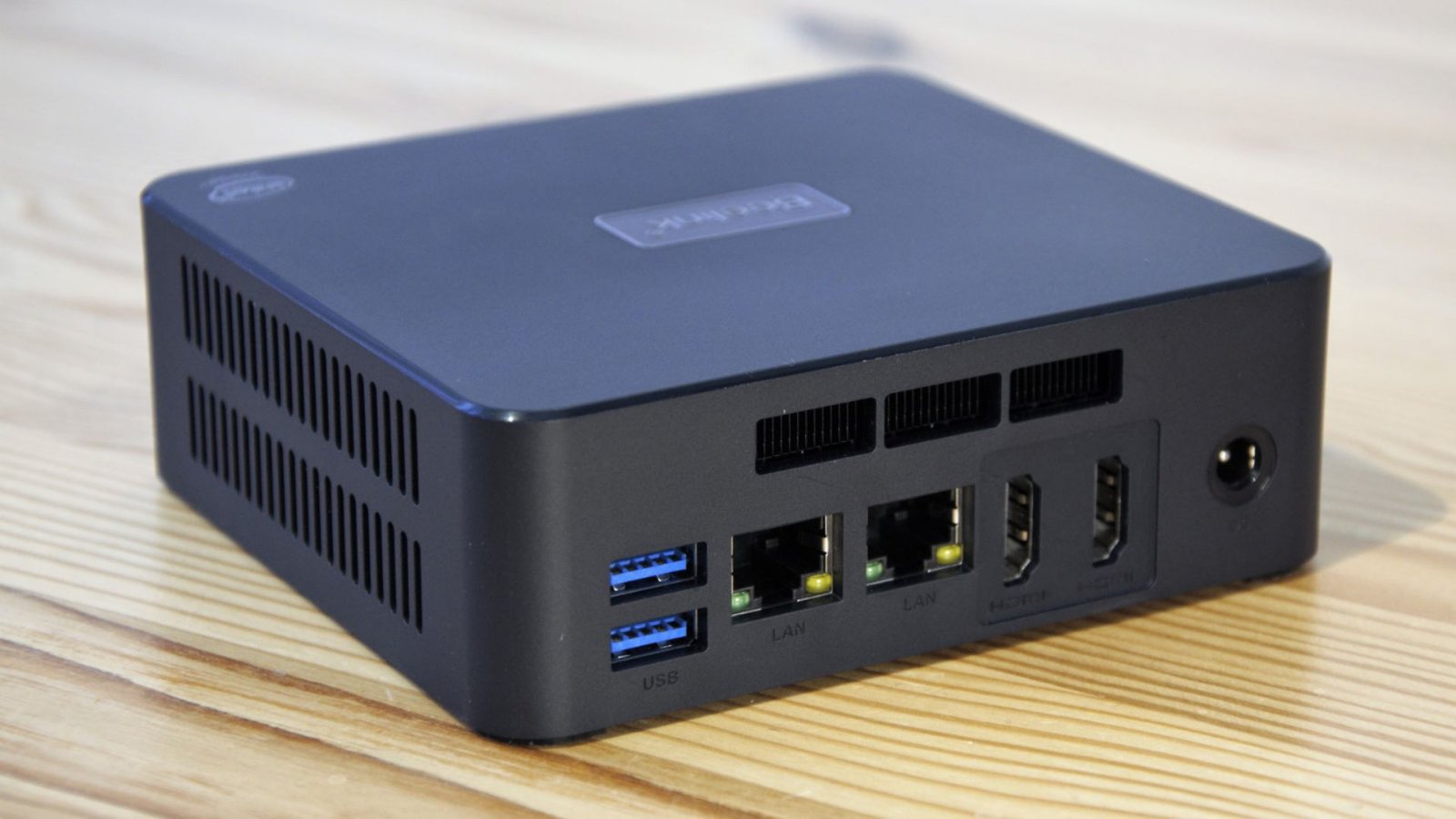
A successful home office setup relies heavily on its ability to connect to a diverse array of peripherals. A key strength of the modern Mini PC is its surprisingly robust selection of input/output (I/O) ports, often surpassing what is found on similarly priced laptops.
A typical high-quality Mini PC will feature:
- Multiple USB Ports (USB-A and USB-C): Essential for connecting keyboards, mice, webcams, printers, and external storage. The inclusion of high-speed USB 3.2 or Thunderbolt ports ensures blazing-fast data transfer.
- Video Outputs: Most models support dual or even quad-monitor setups via HDMI, DisplayPort, or USB-C (DisplayPort Alt Mode). Multi-monitor support is a non-negotiable for many professionals, and the versatility of the Mini PC ensures you can drive two or three 4K displays simultaneously for maximum screen real estate.
- Networking: The inclusion of 2.5 Gigabit Ethernet (2.5GbE) is becoming standard on many high-end units, offering superior network speeds compared to traditional Gigabit Ethernet, which is a major benefit for large file transfers or high-speed data backup.
- Wireless: Fast Wi-Fi 6E or Wi-Fi 7 is often standard, providing reliable, low-latency connectivity for cloud-based work and video calls.
This expansive I/O makes the Mini PC the central hub of your digital life, effortlessly integrating into any complex workstation setup. Moreover, their small stature makes them incredibly versatile outside the main desk, easily transitioning into roles like a dedicated home theater PC (HTPC), a powerful media server, or a digital signage player in a small business setting. This versatility adds significant long-term value to the initial investment. Before purchasing, it’s always wise to research the port layout to ensure it meets your specific needs; a review on a site like TechRadar can offer excellent comparative analysis of connectivity options across various brands.
Energy Efficiency and Whisper-Quiet Operation
In a dedicated home office, ambient noise can be a major distraction, and rising energy costs are a growing concern. The Mini PC excels in both of these areas, providing a more pleasant and cost-effective user experience compared to its full-sized predecessors.
Acoustic Comfort
Traditional desktop towers often house large, powerful fans required to cool high-performance components, leading to an audible whir that permeates the workspace. Mini PCs, designed with highly efficient components and often featuring advanced, low-profile cooling systems (including passive or near-silent fans), operate at significantly lower noise levels.
Many of the top-rated models are described as “whisper-quiet” even under moderate load. This acoustic advantage creates a more serene and productive environment. This is especially beneficial for professionals who spend hours on video calls, as a silent Mini PC prevents unwanted background noise from distracting clients or colleagues.
Lower Power Consumption
The compact design inherently leads to lower power consumption. While a high-end desktop gaming PC can draw hundreds of watts, a typical Mini PC for office work often operates using a fraction of that, frequently drawing less than 50 watts during standard use and sometimes as little as 10-20 watts at idle. This energy efficiency not only saves money on your electricity bill but also contributes to a lower carbon footprint, aligning with increasingly popular sustainable technology goals. When you consider that your computer might be running for eight or more hours a day, the cumulative energy savings offered by a highly efficient Mini PC are substantial.
To ensure your computer components are working at peak efficiency, and to manage heat and noise, regular maintenance is important.
Choosing Your Perfect Mini PC: Key Features and Considerations
Selecting the ideal Mini PC for your home office requires balancing budget, performance, and specific workflow needs. While the core promise of power in a small package is consistent, the internal specifications can vary dramatically, impacting your daily productivity.
1. CPU and Performance Tier
The processor is the heart of the Mini PC and should be your primary consideration.
- Entry-Level (for basic tasks): For simple tasks like web browsing, email, and word processing, a machine with an Intel Core i3 or AMD Ryzen 3, or even a newer-generation Intel N-series (like the N100/N300), will suffice. These are the most budget-friendly and energy-efficient options.
- Mid-Range (The Home Office Sweet Spot): For general professional multitasking, running specialized software, and smooth video conferencing, aim for an Intel Core i5 or AMD Ryzen 5. This is the sweet spot that provides the best balance of performance and value for most knowledge workers.
- High-End (For Creators and Developers): If your work involves intensive tasks like 4K video editing, large dataset processing, or complex software development, you should invest in an Intel Core i7/i9 or AMD Ryzen 7/9. Look for models that incorporate a powerful integrated GPU or, in rare cases, a small discrete graphics card. These machines offer desktop-level performance suitable for the most demanding professional workflows.
2. RAM and Storage
While many Mini PCs are upgradable, it is wise to start with a configuration that offers enough headroom.
- RAM: 16GB is the minimum recommended for serious multitasking in a professional setting. While 8GB can work for very light use, 16GB ensures smooth operation when juggling multiple applications, browsers with dozens of tabs, and collaboration tools. Consider 32GB if you routinely run virtual machines or do heavy media work.
- Storage: Always prioritize a Solid State Drive (SSD), preferably an NVMe M.2 drive, for the primary operating system and applications. A 512GB or 1TB SSD is a great starting point, though some Mini PCs offer dual drive bays (one M.2, one 2.5-inch SATA) allowing you to add a larger, slower hard drive or SSD for bulk storage.
3. Connectivity and Ports
Review the I/O as discussed previously. Make sure the unit has the correct video ports (HDMI, DisplayPort) to match your monitor setup, and enough USB-C/Thunderbolt ports if you use modern peripherals or high-speed external storage. The presence of 2.5GbE is a great future-proofing feature.
4. Brand and Reliability
Reliability is paramount for a professional machine. Well-established brands like Dell (OptiPlex Micro), HP (Elite Mini), Lenovo (ThinkCentre Tiny/IdeaCentre Mini), and Apple (Mac mini) offer enterprise-level support and reliability. The independent market, featuring brands like Geekom, Minisforum, and Beelink, often provides excellent value and cutting-edge performance, but it’s crucial to check long-term user reviews for these models regarding thermal management and component quality. For comparative analysis and long-term reliability reports, we highly recommend checking forums and tech review sites like CNET for their expert opinions and product roundups.
The rise of the modern Mini PC marks a significant milestone in desktop computing history. They dispel the myth that high performance requires a large, noisy, and power-hungry box. For the millions of professionals building or refining their home offices, the Mini PC offers an unparalleled combination of power, efficiency, and space-saving design. It is the perfect anchor for a contemporary, highly productive, and visually appealing workspace.
Final Verdict: Embrace the Tiny Titan
The era of the colossal desktop tower for everyday professional work is quickly fading. The Mini PC has proven itself to be a formidable, future-proof, and aesthetically superior alternative for the modern home office. It delivers the speed and versatility of a full-fledged desktop, allowing you to run complex applications and multiple monitors, all while fitting neatly into the palm of your hand.
By choosing a high-quality Mini PC, you are not just buying a computer; you are investing in a more organized, quieter, and energy-efficient workspace. Whether you are a creative professional, a software developer, or simply someone who needs a reliable machine for daily productivity, the Mini PC offers a compelling package that is hard to beat. Take advantage of its modularity, efficiency, and desktop-class power to build the ultimate, streamlined home office setup. Don’t let your technology dominate your space; choose a Mini PC and let your work take center stage. For more general Tech Tips and guides on integrating new hardware, the Breezy Tips site is a great place to start your journey.