Skip to content
Turning any song into a karaoke track used to require expensive software and audio engineering skills. Now, thanks to AI, you can separate vocals from music in minutes. The wild part is that AI vocal removal tools are accurate enough that even professional musicians use them for practice and remixing. You might think these tools are only for studio pros, but with a few clicks and the right track, anyone can transform their favorite songs for singing, remixing, or just plain fun.
Table of Contents
- Step 1: Choose Your Song For Vocal Removal
- Step 2: Select An AI Vocal Removal Tool
- Step 3: Upload Your Chosen Song
- Step 4: Process The Track For Karaoke
- Step 5: Download Your Karaoke Version
- Step 6: Test And Enjoy Your New Karaoke Track
Quick Summary
| Key Point | Explanation |
|---|---|
| 1. Start With High-Quality Files | Use MP3, WAV, or FLAC formats for optimal results in vocal removal. High-quality audio aids AI algorithms in achieving better separation. |
| 2. Select Easy Listening Songs | Choose tracks with clear vocal and instrumental separation; simpler arrangements yield cleaner outputs during vocal extraction. |
| 3. Choose the Right Tool | Assess ease of use, supported formats, and output quality when selecting an AI vocal removal app for the best results. |
| 4. Adjust Processing Settings | Utilize different processing configurations to fine-tune the vocal removal, ensuring you maintain the track’s musical integrity. |
| 5. Test Across Multiple Devices | Play the final karaoke version on various audio systems to confirm sound quality and track performance before use. |
Step 1: Choose Your Song for Vocal Removal
Removing vocals from your favorite track opens up exciting musical possibilities. Whether you want to create a custom karaoke experience or practice singing along without the original vocals, selecting the right song is your first crucial step in using AI vocal removal technology.
Digital Music File Requirements
Not every audio file works perfectly with vocal removal tools. You will want to start with high quality digital music files that have clear instrumental and vocal separation. MP3, WAV, and FLAC formats typically provide the best results for AI vocal removal algorithms. Music with complex layered arrangements or heavy sound effects might pose challenges for automatic vocal extraction.
Before selecting your track, consider a few key factors that impact vocal removal success. Songs with distinct vocal and instrumental tracks will yield cleaner results. Pop, rock, and standard contemporary music genres often work best because their production tends to have more straightforward audio mixing. Classical recordings, live performances, or heavily remixed tracks might produce less predictable outcomes.
Research from Stanford’s Center for Computer Research in Music and Acoustics suggests that digital audio files with clear stereo separation provide the most accurate vocal removal. This means choosing songs recorded in professional studios with well balanced instrumental and vocal tracks.
When preparing your song, ensure you have a digital copy stored on your computer or mobile device. Check the file size and audio quality before beginning the vocal removal process. High bitrate files between 256 kbps and 320 kbps will generally provide superior results compared to lower quality compressed audio.
Here is a checklist summarizing the requirements and best practices to follow before uploading an audio file for AI vocal removal.
| Requirement | Details | Why It Matters |
|---|---|---|
| Audio File Format | MP3, WAV, FLAC | Ensures compatibility and higher vocal extraction quality |
| File Quality | 256 kbps–320 kbps bitrate | High quality increases success for AI separation |
| Stereo Separation | Yes (preferably studio recordings) | Distinct channels improve AI vocal removal accuracy |
| Musical Arrangement | Simple and clear | Clear vocals and instruments lead to cleaner results |
| File Size | Within platform limits | Prevents upload errors and processing failures |
| Digital Storage | File stored locally | Faster uploads and easier file management |
Pro tip: Start with familiar songs that you know have relatively simple musical arrangements. This will help you understand how the AI vocal removal process works and allow you to quickly identify the effectiveness of different tools and techniques.
Step 2: Select an AI Vocal Removal Tool
Choosing the right AI vocal removal tool can make the difference between a crisp instrumental track and a muddy audio mess. The market offers several online and desktop applications designed to separate vocals from background music with impressive accuracy.
Understanding AI Vocal Removal Software
Modern AI vocal removal tools leverage advanced machine learning algorithms that analyze audio frequencies and isolate vocal tracks from instrumental backgrounds. These sophisticated tools can handle different musical genres and recording styles, providing users with flexible options for creating custom karaoke tracks or instrumental versions of their favorite songs.
Research from Columbia University’s Audio Technology Lab demonstrates that contemporary AI tools can achieve remarkable vocal separation by using deep neural networks that recognize and distinguish between vocal and instrumental frequencies. When selecting your tool, consider factors like ease of use, supported file formats, and output quality.
Some popular AI vocal removal platforms offer web-based solutions that require no software installation. These browser-based tools allow quick uploads and near-instant vocal extraction. Desktop applications, while potentially more complex, often provide more advanced customization options and higher quality audio processing.
Key considerations when selecting your AI vocal removal tool include:
- Supported audio file formats (MP3, WAV, FLAC)
- Processing speed
- Output audio quality
- User interface complexity
- Price (free vs paid options)
Most AI vocal removal tools follow a straightforward process: upload your audio file, select processing settings, and download the instrumental or vocal-removed track.
Some advanced platforms even allow fine-tuning of vocal separation, giving you greater control over the final audio output.
Whether you are a musician looking to create backing tracks, a karaoke enthusiast, or simply curious about audio manipulation, choosing the right AI vocal removal tool will significantly impact your experience. Take time to experiment with different platforms and find the one that best meets your specific audio processing needs.
Step 3: Upload Your Chosen Song
With your preferred AI vocal removal tool selected, uploading your chosen song marks the pivotal moment where digital magic begins transforming your audio track. The upload process is typically straightforward, but understanding a few key details can help ensure optimal vocal removal results.
Preparing Your Audio File
High quality digital files are essential for successful vocal extraction. Before uploading, verify that your audio file meets the technical requirements of your chosen AI vocal removal platform. Most tools support standard formats like MP3, WAV, and FLAC, but file size and audio quality can significantly impact processing performance.
Research from Columbia University’s Audio Signal Processing Lab highlights that digital audio files with clear stereo separation provide the most accurate vocal removal outcomes. This means choosing well-recorded music files with distinct instrumental and vocal tracks will yield superior results.
When preparing to upload, check your file’s specifications. Audio files between 256 kbps and 320 kbps bitrate typically provide the best vocal separation quality. Most AI vocal removal platforms will display file compatibility and size restrictions directly on their upload interface, guiding you through any necessary file adjustments.
The upload process generally follows a simple sequence:
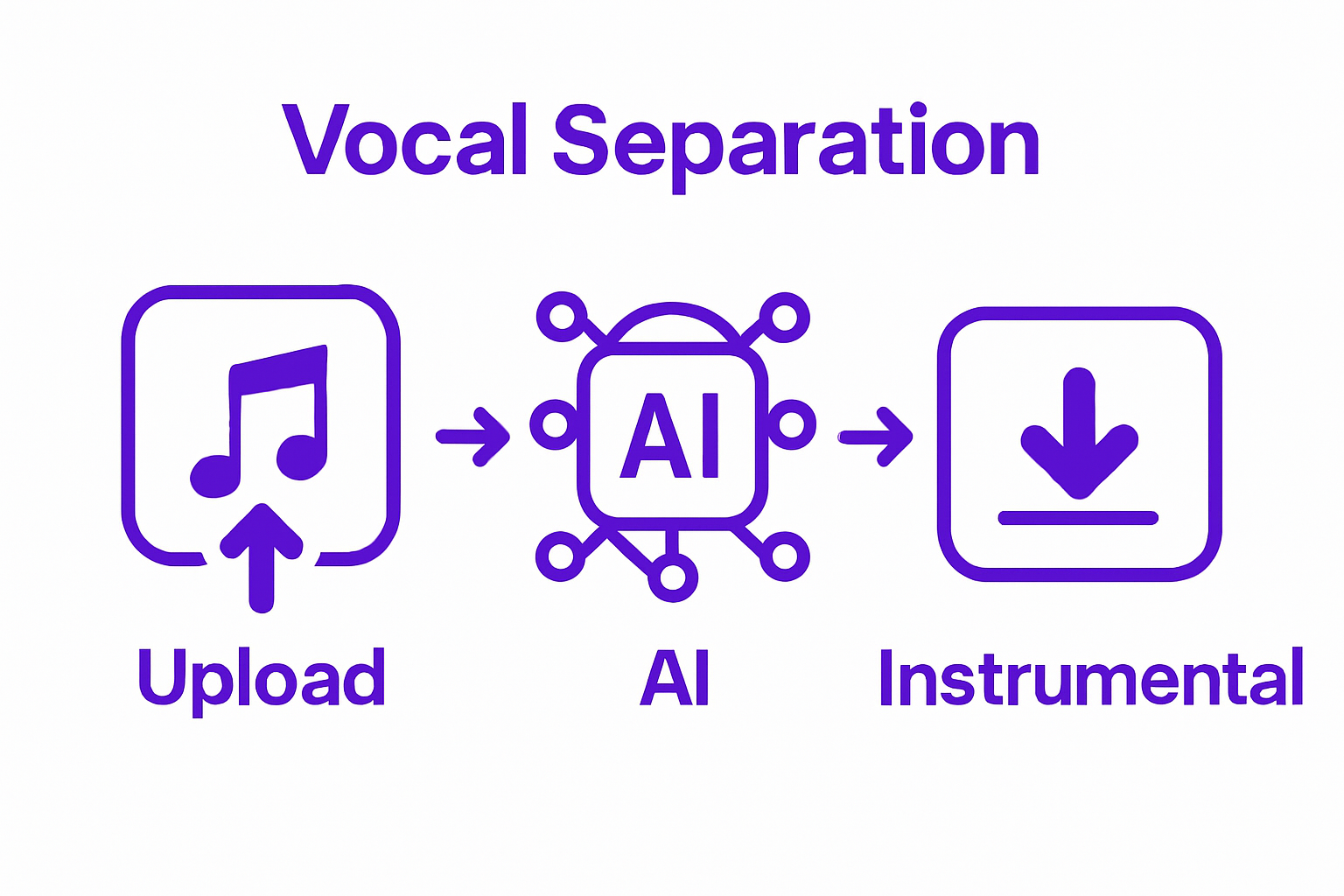
- Locate the “Upload” or “Select File” button on your chosen platform
- Browse your computer or mobile device to find the desired audio file
- Confirm the file meets platform requirements
- Click “Upload” or “Process”
Some web-based tools allow direct drag-and-drop functionality, making the upload process even more seamless. If you encounter any upload errors, double-check your file format, ensure the file is not corrupted, and verify your internet connection is stable.
Below is a troubleshooting table summarizing common issues encountered after AI vocal removal and strategies to resolve them.
| Problem | Possible Cause | Solution |
|---|---|---|
| Vocal remnants in instrumental track | Complex mix, insufficient processing | Reprocess with higher intensity settings or a different tool |
| Audio artifacts or distortion | Aggressive vocal removal, low-quality source | Use higher quality audio file or adjust processing settings |
| File won’t upload | Unsupported format or file size too large | Convert to supported format, reduce file size, or check platform limits |
| Low instrumental clarity | Poor file separation or compressed file | Start with higher quality file or select different song |
| Download issues | Browser/device error or file compatibility | Try another browser/device or download in a different format |
Once your song uploads successfully, most AI vocal removal tools will provide a preview or processing indicator. This signals that the vocal separation algorithm is working its technological magic, transforming your full musical track into a customized instrumental version ready for your creative use.
Step 4: Process the Track for Karaoke
Processing your chosen track into a perfect karaoke version requires attention to detail and understanding how AI vocal removal technology works. Once your audio file is uploaded, the AI will begin its intricate work of separating vocal and instrumental tracks using advanced machine learning algorithms.
Understanding Vocal Separation Settings
Most AI vocal removal platforms offer multiple processing settings that allow you to customize your track’s final sound. Precision is key when adjusting these settings. Depending on your chosen tool, you might encounter options like vocal intensity, instrumental clarity, and audio preservation modes. These settings help fine-tune how aggressively the AI removes vocal elements while maintaining the original track’s musical integrity.
Research from Stanford’s Center for Computer Research in Music and Acoustics demonstrates that sophisticated neural networks can distinguish between vocal and instrumental frequencies with remarkable accuracy. When processing your track, pay close attention to the preview options many platforms provide, allowing you to hear how the vocal removal affects your chosen song before finalizing the output.
The processing time varies depending on your file’s length and complexity. Shorter tracks with simpler musical arrangements typically process faster and yield cleaner results. Complex musical compositions with layered instrumentation might require more advanced AI processing and could take slightly longer to complete.
Key factors to monitor during track processing include:
- Audio quality preservation
- Instrumental track clarity
- Processing speed
- Output file format compatibility
After initiating the vocal removal process, most platforms will provide a progress indicator. Some web-based tools offer real-time processing, while desktop applications might require a brief wait. Once complete, you will typically have options to preview, download, or further adjust your newly created instrumental track.
Remember that no AI vocal removal tool is perfect. Some tracks might retain slight vocal remnants or experience minor audio artifacts. Experimenting with different tools and settings will help you achieve the best possible karaoke track for your needs.
Step 5: Download Your Karaoke Version
As you reach the final stage of creating your personalized karaoke track, downloading your newly processed instrumental version represents the culmination of your audio transformation journey. This step bridges the technological magic of AI vocal removal with your creative musical aspirations.
Selecting the Right Download Format
High quality audio preservation is crucial when downloading your karaoke track. Most AI vocal removal platforms offer multiple file format options, each with unique characteristics that impact sound quality and compatibility with different devices and music players. MP3, WAV, and FLAC are the most common formats, with each offering distinct advantages for your musical needs.
Research from Stanford’s Center for Computer Research in Music and Acoustics emphasizes the importance of selecting an appropriate audio format that maintains the integrity of the instrumental track. When downloading, consider your intended use: WAV files provide uncompressed, high-fidelity audio perfect for professional music production, while MP3 files offer a balanced compromise between quality and file size.
Before completing your download, take a moment to preview the track. Most platforms provide a brief listening option that allows you to verify the vocal removal quality and instrumental clarity. Pay attention to any residual vocal artifacts or unexpected audio modifications that might have occurred during processing.
Consider these factors when downloading your karaoke track:
- Audio file format compatibility
- Sound quality preservation
- File size
- Intended playback device
- Potential further audio editing needs
Some AI vocal removal tools offer additional post-processing options during download. These might include adjusting instrumental volume, fine-tuning audio clarity, or applying subtle audio enhancements that can improve your karaoke experience.
After downloading, immediately test the track on your preferred music player to confirm the file plays correctly and meets your expectations. A successful download means you now have a custom instrumental version ready for your karaoke performance, personal practice, or creative musical exploration.
Step 6: Test and Enjoy Your New Karaoke Track
With your instrumental track now ready, the exciting moment of testing and enjoying your newly created karaoke version has arrived. This final step transforms your technical process into a musical adventure, allowing you to experience the fruits of your AI-powered audio manipulation.
Verifying Audio Quality
Careful listening is essential when first playing your newly processed track. The goal is to confirm that the instrumental version maintains the song’s original musical essence while successfully removing vocal elements. Most AI vocal removal tools aim to preserve the track’s fundamental musical characteristics, but subtle variations can occur during processing.
Research from Stanford’s Center for Computer Research in Music and Acoustics suggests that critical listening involves checking multiple aspects of the instrumental track. Pay attention to instrumental clarity, potential audio artifacts, and the overall sound balance that might have changed during vocal removal.
Start by playing the track on different audio systems. Your smartphone speakers, computer audio, home stereo, and car sound system can each reveal unique characteristics of the processed track. This multi-device approach helps ensure your karaoke version sounds good across various listening environments.
Consider these key evaluation points when testing your track:
- Instrumental clarity and balance
- Absence of vocal remnants
- Overall sound quality
- Compatibility with different playback devices
- Potential need for minor audio adjustments
If you detect any imperfections, most AI vocal removal platforms allow you to reprocess the track with adjusted settings. Some tools offer fine-tuning options that can help you achieve a more precise instrumental version. Experimenting with different processing parameters can often yield improved results.
Once satisfied with the track, the real fun begins.
 Grab a microphone, connect your audio system, and start singing along to your personalized karaoke version. Whether you are practicing for a performance, enjoying a solo music session, or hosting a karaoke party, your AI-generated instrumental track is ready to provide endless musical entertainment.
Bring Karaoke to Life With Simple Solutions From BreezyTips
If you have ever struggled to get clean karaoke tracks from your favorite songs, you know how frustrating it can be when poor vocal separation or confusing software stands in your way. This article showed you how AI vocal removers make it easier to create high quality, custom karaoke versions, but sometimes new tech tools bring their own hurdles. Whether you are dealing with tricky file formats, unclear app settings, or just want your karaoke setup to work every time, BreezyTips has you covered.
Our team specializes in breaking down complicated tech processes and solving everyday problems with practical guides. If you want fast answers on topics from smart vocal removal to streaming fixes, or if you just need quick troubleshooting help, explore our BreezyTips blog for easy-to-understand advice. Get ready to sing loud and stress free by visiting our latest tips today. Don’t wait to make your karaoke night a breeze—discover the solutions you need now.
Frequently Asked Questions
What file formats are best for AI vocal removal?
High-quality digital audio files in MP3, WAV, and FLAC formats work best for AI vocal removal. These formats typically provide clear instrumental and vocal separation, which improves the effectiveness of the vocal extraction process.
How do I choose the right AI vocal removal tool?
Consider factors such as supported file formats, processing speed, output audio quality, and user interface complexity when selecting an AI vocal removal tool. Testing different platforms will help you find the one that best meets your audio processing needs.
What should I do if my track still has vocal remnants after processing?
If you notice vocal remnants in your track, you can try reprocessing the audio with adjusted settings. Many AI vocal removal platforms allow fine-tuning of vocal separation, which can improve the clarity of the instrumental version.
How can I optimize my karaoke experience using an AI vocal remover?
To optimize your karaoke experience, start with familiar songs that have simple musical arrangements. After processing, ensure to test the instrumental track on multiple audio systems to confirm its sound quality and clarity before performing.